I have always wondered the best course of action when giving access to a repo from Github to access and deploy resources to AWS. More often than not, what I see is using credentials in the from of AWS Secret and Access keys curated from a user on AWS IAM. I believein exploring everything through Infrastructure as Code (IAC).
This blog post would be exploring using IAM Roles and setting it up through cloudformation, and granting access to the role and implementing the role in Github Actions. I would be leveraging AWS IAM Idenity Provider, specifically the OpenID Connect (OIDC).
Basically, there are 3 parties involved, an OIDC provider, a user and an application. If a user goes to an application and instead of filling the form, using a username and a password, they could decided to sign up using an OIDC provider (Signup with Google as an example). In that case, Google handles the authentication process also optaining the consent from the user to provide the specific information needed by the application. For more on OpenID Connect, read this blog from Microsoft here.
IAM Role to Github Actions
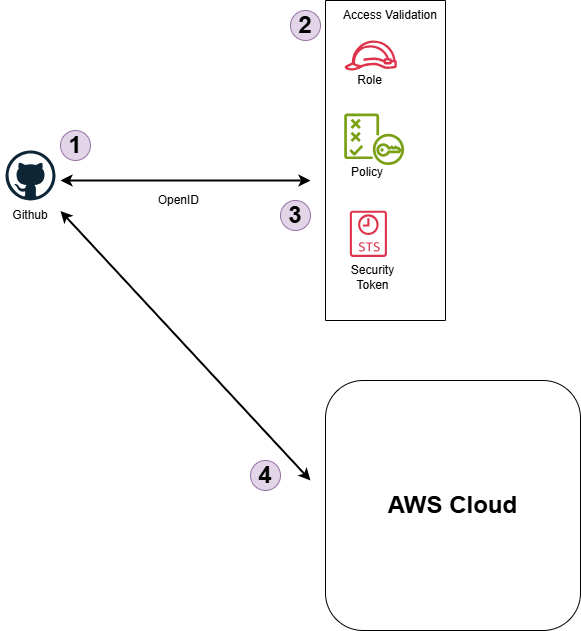
Below are the order of events
Token Request
GitHub Actions workflow requests an OpenID Connect token from AWS.Access Validation
- Role: The IAM role created by the cloudfromation template.
- Policy: The permissions policy attached to the role that defines what actions and resources the GitHub workflows are allowed to access.
- Security Token Service (STS): AWS STS issues temporary security credentials to allow GitHub Actions to interact securely with AWS resources.
Token Exchange
GitHub’s OIDC token is exchanged for AWS temporary security credentials using AWS STS.Accessing AWS Resources
GitHub Actions workflow perform actions on AWS using the temporary credentials
From the above, we could decipher what we need is the role for the deployment.
Below is the template required to create the role:
AWSTemplateFormatVersion: "2010-09-09"

Parameters:
  Enviroment:
    Description: Enviroment which uses the role
    Type: String
    Default: dev
  ProjectName:
    Description: Name of the project
    Type: String
  GithubAccessUrl:
    Description: TGithub provider url
    Type: String
    Default: token.actions.githubusercontent.com
  GithubOwner:
    Description: Name of the github account (Case Sensitive)
    Type: String
  GithubRepo:
    Description: Name of the repository (Case Sensitive)
    Type: String
    Default: "*"
  GithubBranch:
    Description: Name of the Github Branch to allow the deployment from (Case Sensitive)
    Type: String
    Default: "*"

Resources:
  GithubActionsOIDC:
    Type: AWS::IAM::OIDCProvider
    Properties:
      ClientIdList:
        - sts.amazonaws.com
      Url: !Sub https://${GithubAccessUrl}
  GithubActionsRole:
    Type: AWS::IAM::Role
    Properties:
      RoleName: !Sub ${Enviroment}-${ProjectName}-GithubActionsRole
      AssumeRolePolicyDocument:
        Version: "2012-10-17"
        Statement:
          - Effect: Allow
            Principal:
              Federated: !GetAtt GithubActionsOIDC.Arn
            Action: sts:AssumeRoleWithWebIdentity
            Condition:
              StringEquals:
                token.actions.githubusercontent.com:aud: sts.amazonaws.com
              StringLike:
                token.actions.githubusercontent.com:sub: !Sub repo:${GithubOwner}/${GithubRepo}:${GithubBranch}
      Policies:
        - PolicyName: GithubActionsPolicy
          PolicyDocument:
            Version: "2012-10-17"
            Statement:
              - Effect: Allow
                Action:
                  - s3:GetObject
                  - s3:PutObject
                  - s3:ListBucket
                  - s3:DeleteObject
                Resource:
                  - "<Your S3 Bucket ARN>"
                  - "<Your S3 Bucket ARN>/*"
Outputs:
  GithubRoleArn:
    Description: The Role ARN to use on Github
    Value: !GetAtt GithubActionsRole.Arn
The above template contains both parameters which are required input and the resources that would be provisioned.
Parameters
- Enviroment: The enviroment which the utilize the role would provision the resources. The default is dev and could be changed.
- ProjectName: The name of the project that requires the role.
- GithubAccessUrl: This is the access url for the github which the Identity Center would treat as the source of the request. This allows the role to be tied to github as it is the only application who would receive the call.
- GithubOwner: The name of the organization or Github account that would use the role. It is case sensitive.
- GithubRepo: This is the name of the repository that would use this role. The default is ‘*’ which allows all repositories, it could be changed and it is case sensitive.
- GithubBranch: The name of the branch that allows the role could be used from. The default is ‘*’ which allows all branches, it could be changed and it is case sensitive.
Resources
- GithubActionsOIDC: The OpenID Connect Provider, in this case Github.
- GithubActionRole: The role which is created for the Github Actions.
- AssumeRolePolicyDocument: The policy which states who is going to assume the role and from which end. The principal here is from the Github which is the provider.
It also contains conditions as through which route would the principal come through, as stated earlier on, the principal must come through AWS STS which allows the principal (Github) to assume the role for the default session of an hour.Principal: Federated: !GetAtt GithubActionsOIDC.ArnThe condition here is the major security part of where it states before the role is assumed, the call must come from this particular github organization and this particular respository.Condition: StringEquals: token.actions.githubusercontent.com:aud: sts.amazonaws.com StringLike: token.actions.githubusercontent.com:sub: !Sub repo:${GithubOwner}/${GithubRepo}:${GithubBranch}- Policies: This section takes care of other additional policies required by the role.
An example example is granting the GetObject, PutObject, ListBucket, DeleteObject permission to the role to be used by Github Actions. For more policy, check AWS Policy Generator.
Outputs
- GithubRoleArn: The ARN for the created role.
Use of ROLE
The created role could be used in the Github Actions workflow as below:
name: Deploy Site to S3

on:
  push:
    branches: ["dev"] # Could be the branch to access the role

permissions:
  contents: read
  id-token: write

jobs:

  deploy:
    runs-on: ubuntu-latest
    name: Deploy to S3
    steps:

      - name: "Configure AWS Credentials"
        uses: aws-actions/configure-aws-credentials@v4.0.2
        with:
          audience: sts.amazonaws.com
          role-to-assume: ${{ secrets.ASSUME_ROLE }} # The role to assume (The ARN of the created role)
          role-session-name: GithubActions-PersonalWebsite
          mask-aws-account-id: true # Hide Your AWS Account in workflow outputs

      - name: Sync to S3
        id: deployment
        run: aws s3 sync public/ s3://${{ secrets.BUCKET_NAME }} --delete # Name the resouce to interact with
Things to note
on:
  push:
    branches: ["dev"] # Could be the branch to access the role
This if the GithubBranch in the cloudformation template has a branch which the role has to accept, it should be the name of the branch in the Github action workflow.
permissions:
  contents: read
  id-token: write
The permission has to be stated.
- name: "Configure AWS Credentials"
    uses: aws-actions/configure-aws-credentials@v4.0.2
    with:
        audience: sts.amazonaws.com
        role-to-assume: ${{ secrets.ASSUME_ROLE }} # The role to assume (The ARN of the created role)
        role-session-name: GithubActions-PersonalWebsite
        mask-aws-account-id: true # Hide Your AWS Account in workflow outputs
In the workflow, the role arn gotten from the Output of the cloudformation template has to be called here. Also you could name the session.
Conclusion
Your Workflow access between Github and AWS is now secure and you could deploy or create resources on the fly.
Congratulations! You’ve fought for the good side of humanity.
If you have needs beyond what is described here, don’t hesitate and get in touch.